Practice Mode: Learn by Doing#
Reading about baseball scoring is one thing. Actually doing it — deciding which button to tap for a 6-3 groundout, figuring out where to log a stolen base — is something else entirely. The gap between understanding the rules and developing the muscle memory to score confidently takes practice.
BaseballScorer’s practice mode closes that gap by walking you through a real MLB game, one play at a time, with guidance at every step.
How It Works#
Practice mode loads a real MLB game from bundled data — actual plays, actual sequences, actual outcomes — and guides you through scoring it from the beginning. Each play is broken into stages so you’re never asked to do everything at once.
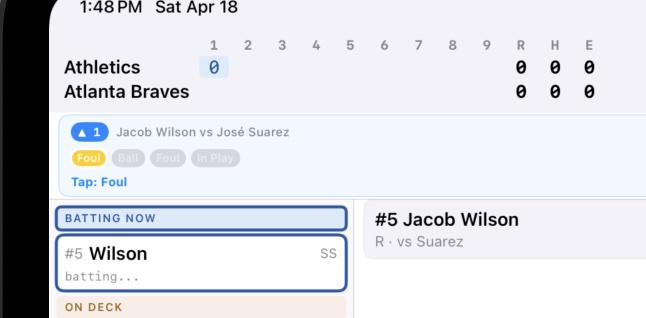
The practice play card shows you:
- Which inning you’re in
- The batter and pitcher matchup
- Where you are in the game — a counter like “3 / 15” tells you this is the 3rd play out of 15 total
Progressive Reveal#
Scoring a play has multiple steps: pitches, then the outcome, then any baserunner movements. Practice mode reveals these one stage at a time, so you’re not overwhelmed trying to do everything at once.
Step 1: Pitches. The app shows you the first pitch and asks you to record it. Ball? Strike looking? Foul? Tap the right button.
Step 2: Outcome. Once the at-bat is complete, you’re shown what happened — a single, a strikeout, a groundout — and prompted to record it using the right notation.
Step 3: Runners. If there were baserunner events — a runner advancing on a hit, a stolen base — those come next.
At each stage, highlighted capsules show you exactly which button to tap. You’re not guessing; you’re learning the gesture and reinforcing where each action lives in the interface.
Feedback on Every Tap#
Tap the wrong button and you get an immediate red flash. No penalty, no starting over — just a clear signal that this wasn’t the right choice, so try again. Tap the right button and the app advances to the next step.
This is how skills get built: immediate feedback, repeated correctly, until the right tap becomes automatic. After a few innings of practice, you won’t need the highlights anymore. You’ll know where the strikeout button is.
Who Practice Mode Is For#
Complete beginners — If you’ve never kept a scorecard and the notation looks like a foreign language, start here. Practice mode is designed to be your first experience with scoring, not a test of what you already know.
Returning scorers — Maybe you scored games years ago and want to refresh the muscle memory. A practice session or two will get you back up to speed faster than re-reading the rules.
Anyone learning BaseballScorer — Even if you know how to score, practice mode is a great way to learn where everything lives in the app before you sit down at a live game.
Getting Started#
Practice mode is available from the main menu before you start a real game. You don’t need to set up teams, choose a ruleset, or connect to any live data — just open it and start playing.
The game used for practice is real. The plays happened. When you’ve worked through a session, you’ll have scored an actual MLB game, and you’ll know what you’re doing.
Once you’re comfortable with the basics in practice mode, you’re ready to score a real game. Check out Scoring Along with Live MLB Games if you want to score a live game with the safety net of auto-fill, or jump straight into a new game from the Today screen.