Rulesets: Scoring Different Leagues#
Baseball isn’t one game. A Little League game in your town and a World Series game at Dodger Stadium share the same basic DNA, but the rules around innings, lineups, designated hitters, and extra-inning tiebreakers vary significantly. If you’re scoring your kid’s rec-league game, you don’t want MLB settings — and if you’re scoring a postseason game, you don’t want the ghost runner showing up in the 10th.
BaseballScorer lets you select a ruleset when you start a game, so the app’s counting and logic match the rules being played.
What a Ruleset Controls#
Each ruleset is a bundle of settings that govern how the game works:
| Setting | What it does |
|---|---|
| Regulation innings | How many innings constitute a complete game |
| Lineup size | How many batters in the batting order |
| Designated hitter | Whether a DH is used |
| Ghost runner | Automatic runner on second to start extra innings |
| Mercy rule | Run differential that ends the game early |
| Reentry | Whether substituted players can return |
| Max pitches | Pitch count limit per pitcher (common in youth leagues) |
| Challenges | Manager challenge count |
| Tie allowed | Whether the game can end in a tie |
You don’t need to think about all of these for every game — that’s what presets are for.
The Built-In Presets#
MLB#
The standard Major League Baseball ruleset. 9 innings, 9 batters, DH in use (since the universal DH was adopted). No mercy rule. No ghost runner in regulation; ghost runner applies in extra innings under current MLB rules. Three manager challenges.
Use this for scoring MLB games on TV or in person.
MLB Postseason#
Same as MLB, but with modifications that apply in October: ties are not allowed (games continue until a winner is determined), and challenge rules may differ. If you’re scoring a playoff game, use this preset to get the extra-inning behavior right.
College Baseball#
College ball plays by NCAA rules: 9 innings, no universal DH (though conferences vary), and the ghost runner rule is used in extra innings. Mercy rule applies (typically 10 runs after 7 innings). No challenges. Pitch count limits per-appearance aren’t tracked at the college level, but weekday vs. weekend starter pitch limits exist in some contexts.
Little League#
Little League is where the settings diverge most from the major leagues. Fewer regulation innings (typically 6), a strict pitch count per pitcher (75 pitches for players 11-12), mandatory rest based on pitch counts, a mercy rule, and a lineup size that may include continuous batting orders. Reentry rules allow players who leave the game to return under certain conditions.
If you’re scoring youth baseball, this preset handles the rules that matter most.
Softball (Fastpitch)#
Fastpitch softball uses 7 innings, a different pitching motion, and often an international tiebreaker rule (ghost runner) in extra innings. Lineup and substitution rules differ from baseball. This preset is appropriate for high school, college, and competitive club fastpitch.
Softball (Slowpitch)#
Slowpitch uses 7 innings with different scoring dynamics — more hits, more runs, different defensive alignments. Lineup sizes may be larger (10 fielders in some formats). This preset handles recreational and competitive slowpitch leagues.
Custom Rulesets#
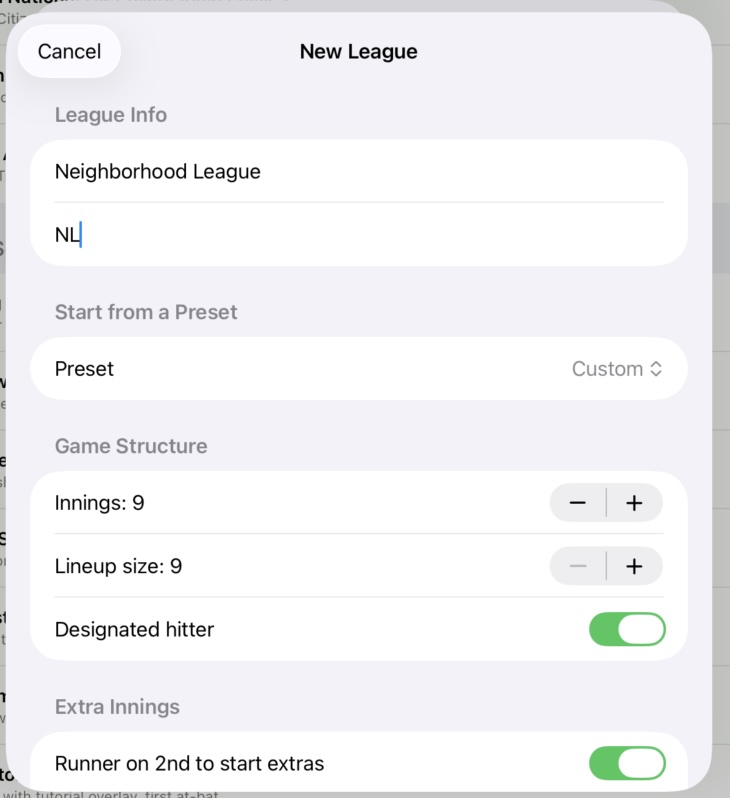
If none of the presets match your situation exactly, you can customize any setting manually. Maybe you’re scoring a 7-inning doubleheader game under MLB rules, or a tournament game with a 1-hour time limit converted to innings. Start from the closest preset and adjust from there.
Common reasons to customize:
- Tournament rules that differ from standard league play
- Modified games with shorter innings or expanded rosters
- Experimental formats like four-out innings or six-batter lineups
- House rules in casual play
BaseballScorer doesn’t enforce your ruleset settings against what you enter — it uses them to drive counting logic (when to suggest half-inning changes, when the mercy rule is in range) and for display. You’re always the scorer; the app is always your assistant.
Non-MLB Rules in the Line Score#
When you’re using a non-MLB ruleset, BaseballScorer shows a blue summary label in the line score strip at the top of the scoring view. This label identifies the active ruleset — “Little League,” “College,” “Fastpitch” — so it’s always clear what rules are in play.
This matters when you’re sharing a scorecard or reviewing it later. The ruleset context is part of the record.
Choosing the Right Ruleset#
A quick guide:
- Watching an MLB regular-season game? → MLB
- Watching the playoffs? → MLB Postseason
- Scoring your college team? → College Baseball
- Scoring your kid’s game? → Little League (adjust pitch count limit for your age division)
- Competitive fastpitch tournament? → Softball (Fastpitch)
- Park district slowpitch league? → Softball (Slowpitch)
- Something unusual? → Start with the closest preset, then customize
The ruleset doesn’t need to be perfect to be useful. Even if your local rec league has slightly different mercy rule thresholds, using the Little League preset gets you 90% of the way there with minimal setup.
For reference on how specific plays are notated across all rulesets, see the Notation Cheat Sheet.