The Scorecard#
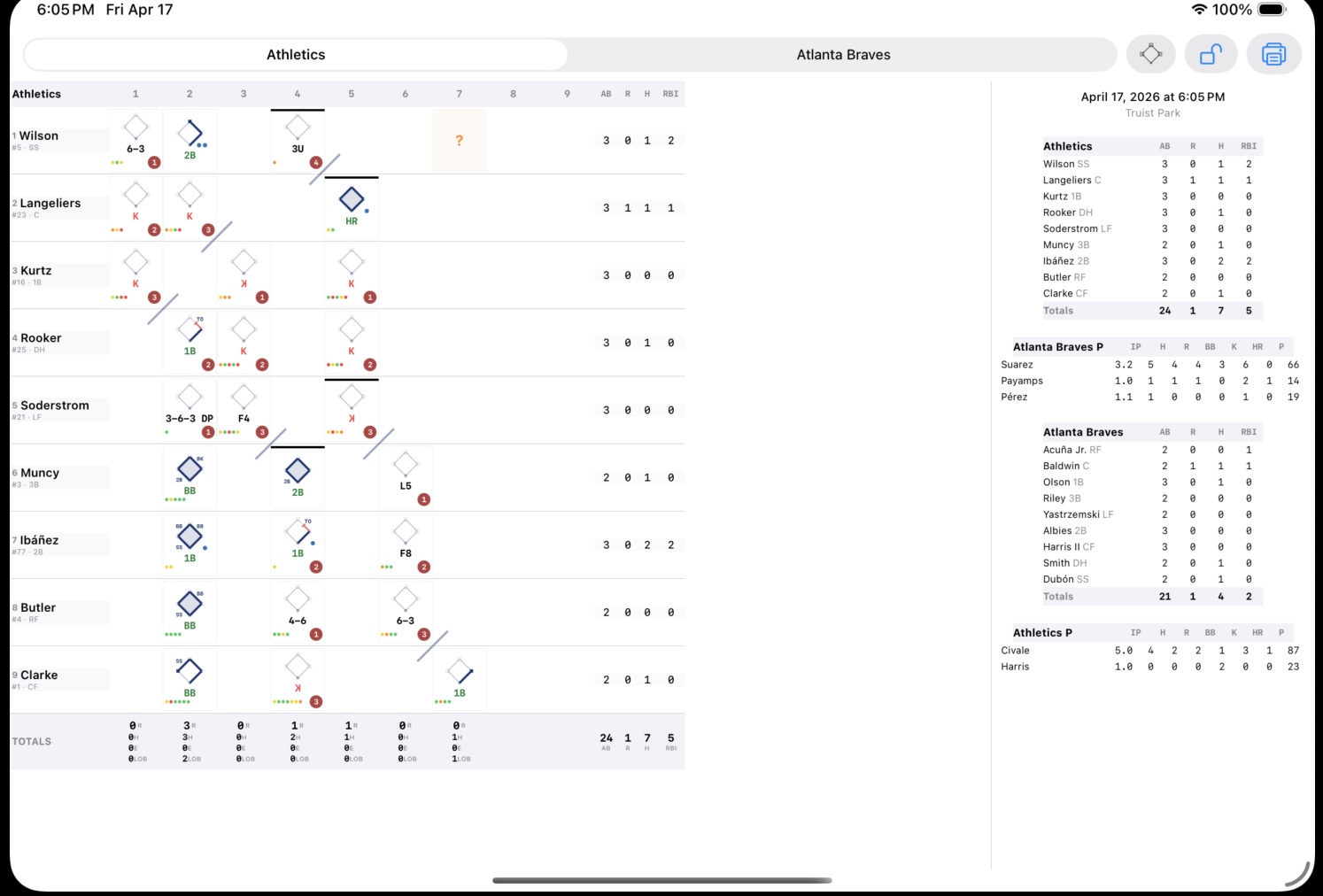
A baseball scorecard is a grid. Rows are batters; columns are innings. Every cell in that grid represents one plate appearance — one batter, one inning. By the time the game ends, you’ve filled in a compact, readable history of everything that happened.
That’s the whole structure. Everything else is just notation inside those cells.
The Layout#
The Lineup Column#
The leftmost column lists the batting order: nine rows, one per lineup spot. You write the player’s name (or number, or abbreviation — whatever works for you) and their position.
In a nine-inning game, each batter might come up two or three times. The same row extends all the way across the card, so a player’s entire game — every at-bat from first to last — is on one horizontal line. You can look at a single row and see exactly how someone performed.
The Inning Columns#
Nine columns for nine innings, plus extras if the game goes long. Each column is narrow — just wide enough to hold the at-bat notation for one batter.
As batters cycle through the lineup, you move down the column. When the third out is recorded, you move to the next column. When you reach the bottom of the batting order and wrap back to the top, you continue in the same column but start a new row (or a continuation mark, depending on the scorecard format).
The Totals Row#
At the bottom (or sometimes the right side) of the scorecard: running totals for runs, hits, errors, and left on base by inning. This lets you reconstruct the line score — the inning-by-inning run total displayed on the scoreboard.
Inside Each Cell#
This is where the art of scorekeeping lives. Each cell has to communicate: Who batted? What happened? Where did everyone end up?
The Mini Diamond#
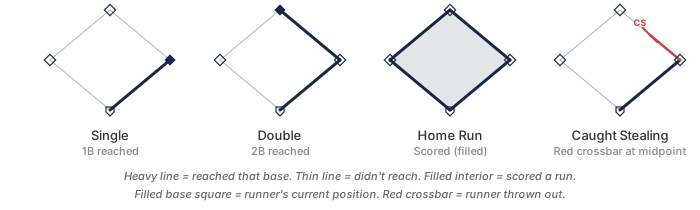
Most scorecard cells contain a small diamond — a square rotated 45 degrees — representing the bases. Home plate is at the bottom, first base on the right, second at the top, third on the left.
You trace the batter’s path around the bases by drawing lines along the edges of this diamond. A single: line from home to first. A home run: all four lines, completing the diamond, often filled in or circled.
The Outcome Notation#
In the center of the cell (or nearby), you write what happened. This is the shorthand that experienced scorekeepers read instantly:
- K — strikeout swinging
- Kc (or backwards K) — strikeout looking
- BB — walk
- 1B, 2B, 3B, HR — hit for extra bases (singles sometimes just shown with a line)
- 6-4-3 — ground out, shortstop to second to first (a double play)
- F8 — fly out to center field
- E6 — reached on error by the shortstop
- FC — fielder’s choice
See scoring notation for the full reference.
Pitch Dots#
Many scorekeepers track pitches: a dot for each pitch, sometimes coded by type (strike, ball, foul). The pitch sequence fills in around the diamond notation, giving you a count history for every at-bat.
Pitch tracking is optional but rewarding — it’s how you know a batter fouled off six pitches before walking, or how you catch that a pitcher is suddenly struggling to throw strikes.
Runners#
When a batter reaches base, they become a runner, and now you have to track two things: the original batter’s at-bat and what happens to that runner later. The mini diamond helps — you draw their advancement around the bases in their original cell, extending the line as they move on subsequent plays.
A scored run completes the diamond. A runner left on base when the inning ends leaves the diamond incomplete.
How BaseballScorer Maps to Paper#
BaseballScorer’s scorecard view is a faithful digital translation of the paper original.

The grid is the same. Rows are lineup slots; columns are innings. You scroll horizontally to move through innings, and the lineup column stays fixed so you always know who you’re looking at.
Each cell shows a mini diamond with the runner’s path traced in color — green for reaching base safely, red for outs — plus the outcome abbreviation and pitch dots if you’re tracking pitches.
Pitch dots are shown as small colored circles below or around the diamond, up to seven per row before wrapping. Ball, strike, foul, and hit-by-pitch each have distinct colors.
Color coding makes outcomes scannable at a glance. Green cells mean the batter reached base. Red cells mean an out. The color scheme carries through the whole scorecard so a dominant pitching inning looks visually different from a crooked-number inning.
The scorecard view is read-only — you build it by scoring at-bats in the live scoring view, and the card updates automatically. It’s designed to be the thing you show someone after the game to tell the story of what happened.
Paper vs. Digital#
Paper scorecards are wonderful. They’re tactile, portable (no battery), and the process of writing notation by hand is satisfying in its own right. If you’re at the ballpark, a paper scorecard is a perfectly valid choice.
Digital scoring — in BaseballScorer or any app — adds automatic calculation (no manual run totals), pitch count tracking that doesn’t require juggling a tally, and a scorecard you can share or revisit without scanning paper.
The notation and structure are identical either way. Learn the system once; use it on paper or screen as you prefer.