BaseballScorer Color Guide#
Color is one of the fastest ways to read a scorecard. A quick glance at the green and red on a card tells you whether the inning was productive or the pitcher was dominant. BaseballScorer uses a consistent, intentional color system throughout — buttons, pitch dots, card backgrounds, and the diamond all follow the same logic.
Here’s what every color means and where you’ll see it.
The Core Principle#
Green = positive for the offense. Red = negative for the offense.
Almost everything else follows from this. A walk is green because the batter reached base. A strikeout is red because the batter is out. Orange sits between them — called strikes, fouls, and ambiguous outcomes that aren’t clearly good or bad for either side.
Once you internalize this, the colors stop being labels and start being information.
Color Meanings#
| Color | Meaning | Where you see it |
|---|---|---|
| Green | Batter reached base safely; positive outcome | Hits (1B, 2B, 3B, HR), walks (BB, IBB), errors (E), fielder’s choice (FC); inning summary card tint for batters who reached base |
| Red | Strikeout; out indicator; runner thrown out | Strikeout text (K, Kc), out circles (numbered in white on red), runner-out basepath indicators (CS, pickoff, thrown out on bases) |
| Orange | Called strikes, fouls, warnings, errors in the fielding sense, unknown | Called strike dots, foul ball dots, the ? unknown notation, fielding errors during a sequence |
| Yellow | Foul balls specifically | Foul pitch dots (in some display contexts) |
| Purple | Hit by pitch; edit mode; review border | HBP notation, the edit-mode indicator on a card, review/flagged cards |
| Blue | In play; base paths; MLB data; auto-fill | “In play” pitch state, base path lines on the mini diamond (reached safely), auto-filled at-bat indicator (arrow), MLB reconciliation indicator (sync), RBI counts |
| Brown | Baserunner events not caused by the batter | Wild pitch (WP), passed ball (PB), balk (BK) advancement |
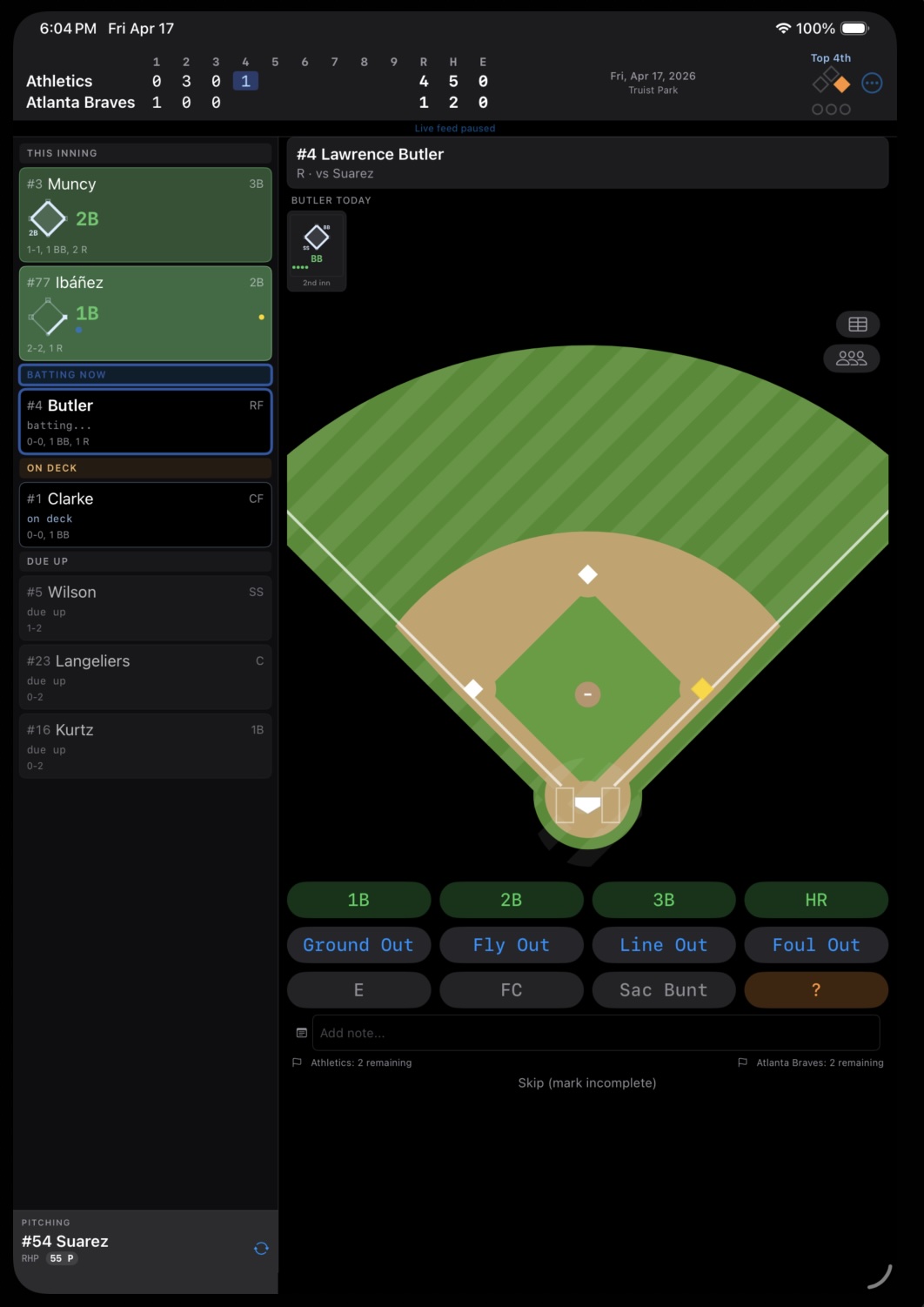
| Gold | Occupied bases | Filled bases on the diamond display |
Pitch Dot Colors#
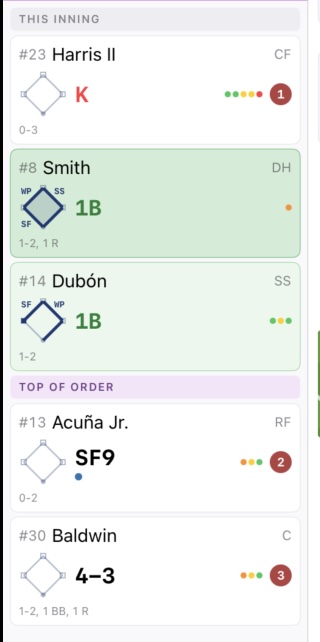
When you record a pitch sequence, each pitch becomes a small dot on the at-bat card. The dot color tells you the pitch result at a glance:
| Dot Color | Pitch Result |
|---|---|
| Green | Ball |
| Red | Strike swinging |
| Orange | Strike called (looking) |
| Yellow | Foul ball |
| Blue | In play (the ball was put in play) |
A full count with a walk looks like: red, green, orange, green, green — three balls, two strikes (well, however the count built). The final green dot is the fourth ball. You can read the at-bat story just from the dots.
Card Background Colors (Inning Summary)#
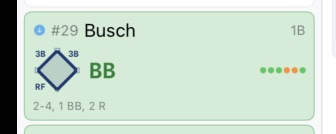
In the inning summary column, at-bat cards use subtle background tints to indicate outcome:
| Background | Meaning |
|---|---|
| Default (neutral) | Batter made an out (ground out, fly out, etc.) |
| Light green tint | Batter reached base (hit, walk, error, FC) |
| Purple border | Card is in edit mode or flagged for review |
The green tint lets you scan an inning at a glance — green cards are batters who reached base. Cards without a tint are outs. Out cards show a red out circle with the out number (1, 2, or 3) rather than a red background.
The scorecard grid does not use tinted backgrounds — cells are all the same neutral background. The visual information is carried by the mini diamond, fielding notation, pitch dots, and out circles.
The Diamond#
The diamond display uses two colors:
| Color | Meaning |
|---|---|
| Gold | Base is occupied by a runner |
| Unfilled / outline | Base is empty |
Gold was chosen because it’s visible, warm, and distinct from both green and red. At a glance, a diamond full of gold bases means bases loaded — opportunity.
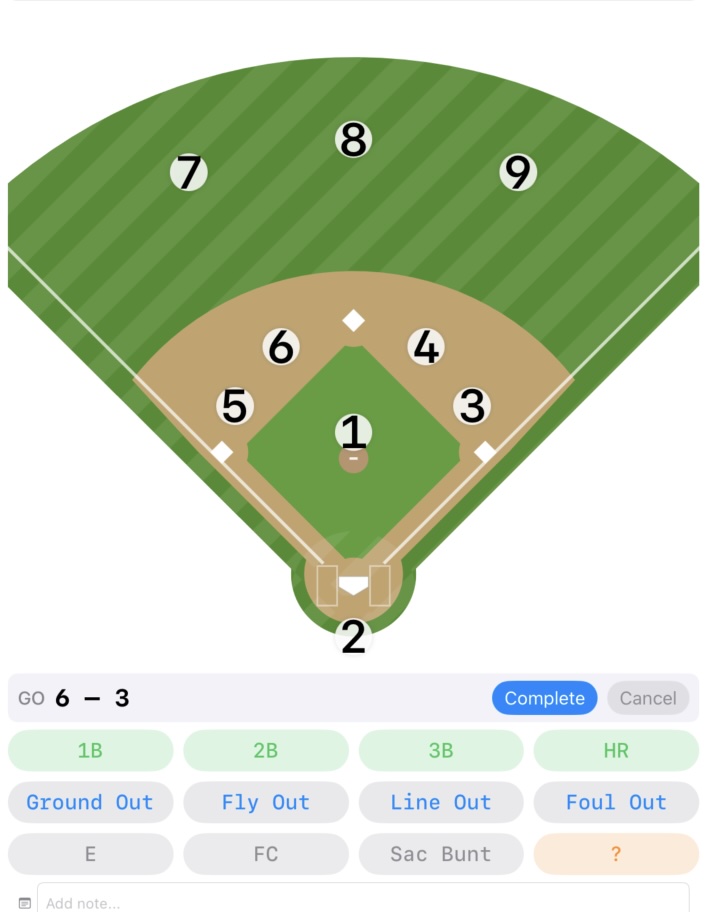
During fielding sequences, the fielder positions are highlighted on the diamond so you can tap them in order. The active/selectable fielders appear distinctly from the background.
Blue: The MLB Data Color#
Blue has a specific role in BaseballScorer: it marks anything that came from the MLB live data feed.
| Blue Element | Meaning |
|---|---|
| Blue arrow icon on a card | At-bat was auto-filled from the MLB feed |
| Blue sync icon on a card | At-bat was manually scored, then reconciled with the MLB feed |
| Blue RBI indicator | Run batted in (standard blue, not feed-specific) |
| Blue “in play” state | A pitch was put in play during recording |
The reason blue is reserved for MLB data is so you can always tell, without thinking, which plays you scored yourself and which came from the feed. See Auto-Fill from the MLB Feed for how this works.
Dark Mode#
BaseballScorer fully supports dark mode. All colors are defined using adaptive asset catalog colors, which means they automatically adjust for dark mode without losing their meaning. Green stays green, red stays red — the values shift slightly to maintain contrast against dark backgrounds, but the color language stays consistent.
If you score in low-light conditions (a night game, a dark living room while watching TV), dark mode makes the scorecard much easier to read without the bright white background washing everything out.
Why This System Helps#
The color system isn’t decoration. It lets you answer questions without reading:
- Did the offense do anything this inning? Scan for green.
- Did the pitcher strike out the side? Three red strikeout cards in a row.
- Which at-bats did I score manually vs. auto-fill? Look for blue arrows.
- Are runners on base right now? Check the diamond for gold.
Once you’ve used the app for a game or two, the colors become automatic. You stop reading labels and start reading the field.
For the full notation reference — what every symbol means — see the Notation Cheat Sheet.