The Mini Diamond#
Every cell on a baseball scorecard contains a small diamond — four bases arranged in a square, rotated 45 degrees. It’s tiny, but it’s the heart of the scorecard. The mini diamond shows exactly where a batter went after reaching base, which bases they touched, and whether they scored.
Once you know how to read it, the mini diamond lets you reconstruct the baserunning story of any at-bat at a glance.
The Four Segments#
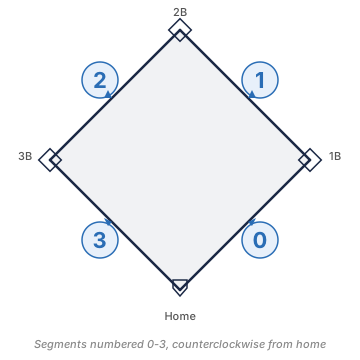
The diamond has four segments, each representing a base path:
- Home to first base (bottom-right leg)
- First to second base (right-to-top leg)
- Second to third base (top-to-left leg)
- Third to home (left-to-bottom leg)
Each segment is drawn either as a heavy blue line or a thin gray line:
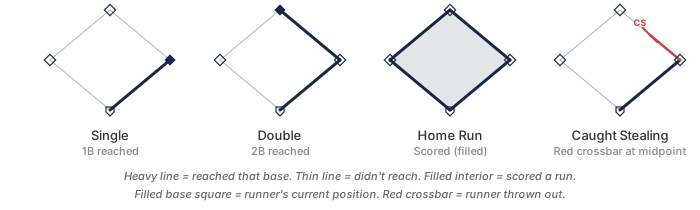
- Heavy blue line — the runner reached this base
- Thin gray line — the runner did not reach this base (or didn’t make it there)
So a batter who hits a single has a heavy blue line on the home-to-first segment, and thin lines on the other three. A batter who hits a home run has heavy blue lines on all four segments.
Scored Runs#
If a runner scores — crosses home plate — the interior of the diamond is filled in with a blue tint. An empty interior means the runner didn’t score, even if they reached base. This single visual cue makes it easy to count runs at a glance: count the filled diamonds.
A home run always has a filled interior and heavy lines on all four segments. A runner who reaches second but gets stranded there has heavy lines on two segments and an empty interior.
Base Squares#
At each corner of the diamond — each base — there’s a small square. The square is filled when the runner is currently occupying that base (i.e., this is where they ended up). An empty square means they passed through or never reached.
This lets you see at a glance where a runner ended their turn on the bases.
Runner Annotations#
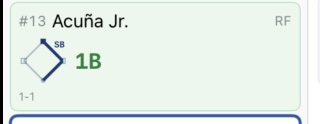
Baserunning events that happen after the batter reaches base are annotated at the midpoint of the segment where they occurred. Common annotations:
- SB — stolen base
- CS — caught stealing
- WP — wild pitch advance
- PB — passed ball advance
- Balk — balk advance
- PO — pickoff
These annotations appear along the line segment, positioned near the midpoint of the base path where the event happened.
For full details on stolen base notation, see Stolen Bases. For wild pitch and passed ball advances, see Wild Pitches and Passed Balls.
Caught Stealing#
Caught stealing gets a distinctive mark: a red half-line extending partway along the base path segment, with a perpendicular crossbar at the midpoint. The crossbar looks like a small “T” turned sideways — it signals that the runner was tagged out mid-path.
This crossbar notation makes caught stealing immediately recognizable as a baserunning out rather than a regular at-bat out. You can see this in the caught stealing example in the diagram above — the red half-line stops partway along the segment with a perpendicular bar.
Multiple Runners in One Cell#
Sometimes a cell needs to show more than one runner’s path — for example, when an at-bat involves a runner already on base who advances while the new batter also reaches. The mini diamond handles this by drawing multiple path lines in different styles or colors, so you can distinguish between them.
In practice, most cells only need to show the batter’s own path. The runners already on base are tracked in their own cells from when they originally reached.
Sizes#
The mini diamond appears at different sizes depending on context:
- Large (~280pt+) — the main scoring view, tappable for base selection and fielder assignment
- Small (40pt) — the inning summary column, giving a quick overview of each at-bat
- Scorecard (28pt) — inside each grid cell, very compact but readable
At small sizes, the segment lines and fill are drawn clearly enough to read the basic story (reached, scored, out) even without the annotations.
In BaseballScorer#
In BaseballScorer, the mini diamond is canvas-drawn — rendered as vector graphics at each size rather than using image assets. This means it’s always crisp at any display density or zoom level.
Color coding adds visual information beyond the line weight:
- The
.fullColorstyle uses rich lines and a warm fill for scored runs - The
.dimmedstyle is used for inactive or historical display contexts - The
.monochromestyle appears in print output and accessibility contexts
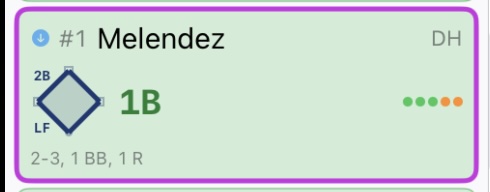
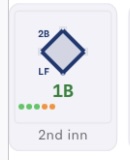
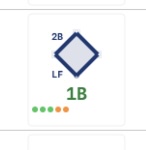
At the large scoring size, the diamond is tappable: tap a base to toggle a runner’s presence, and tap a fielder number overlay to assign fielding sequences. This makes the diamond an interactive field diagram, not just a display element.
At the small summary size, the diamond gives you a quick visual “did they score?” answer for each at-bat in the inning without needing to read the full notation.
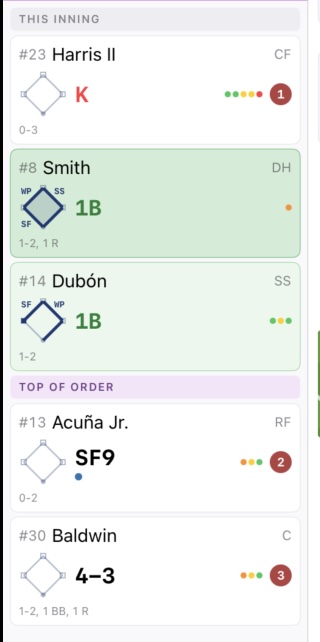
The same canvas-drawing logic produces the diamond at all three sizes, so the visual language is consistent whether you’re scoring live or reviewing the completed scorecard.
See also: Reading the Grid | Stolen Bases | Wild Pitches and Passed Balls | Scoring Notation